SMS Consent & Opt-In Policy
Last updated: July 31, 2026
This page documents the consent basis for every SMS vinRECON sends: express consent from dealership staff before they receive work notifications, and solicited transactional messaging to dealership customers who have asked their dealership for a specific item. It is maintained in accordance with the TCPA, CTIA Messaging Principles & Best Practices, and A2P 10DLC registration requirements.
Who Sends Messages
Messages are sent by vinRECON, a dealership operations platform operated by Louai Othman, a sole proprietorship doing business as vinRECON. vinRECON serves automotive dealerships that subscribe to the platform to manage inventory, reconditioning, audits, and tasks. Messages go to two groups of recipients — dealership staff and dealership customers — described in the next section.
Who Receives Messages
vinRECON sends SMS to two distinct audiences. They have different consent and re-subscribe mechanics:
- Dealership staff — employees and authorized users who have been invited to a vinRECON workspace by their employer. They receive workforce and operational notifications about their own work in the platform. Staff consent is collected in the two ways described below, and is restored only through the in-app consent checkbox.
- Dealership customers — recipients of solicited transactional messages they have asked a dealership for. A customer who has replied STOP can resubscribe by replying START.
Both consent models are documented below. We do not send marketing or promotional SMS to either audience.
How Staff Consent Is Collected (Opt-In)
Staff consent is collected in exactly two ways: a one-time onboarding invite sent by text, and an explicit consent checkbox inside the authenticated vinRECON web and mobile applications at app.vinrecon.com. No other method is used. vinRECON does not buy, rent, or import opt-in lists.
Path 1: One-Time Onboarding Invite
When a dealership administrator adds a new staff member to vinRECON and selects SMS as that person’s notification preference, vinRECON sends a single onboarding invite text to the work mobile number the administrator entered for that employee. The message reads:
vinRECON: {Dealership} invited you. Reply YES to get your account setup link by text and receive work notifications by SMS. Reply NO and we’ll email the link instead. Msg freq varies. Msg&data rates may apply. Reply STOP to opt out, HELP for help.
(Where no dealership name resolves — for example, a provider-created account — the {Dealership} placeholder falls back to the literal words “your dealership”, so a real message log may read “vinRECON: your dealership invited you.”)
This invite is sent at most once per user, ever. There are no retries and no reminder texts. If the recipient never replies, we never text that number again.
- Reply YES grants express consent to receive SMS from vinRECON. The consent is recorded with a timestamp in our consent register, and we text the employee a one-time account setup link.
- Reply NO records the refusal, sets the employee’s notification preference to email, and we email the setup link instead. We do not text them again.
- Reply STOP opts the number out, and is recorded as a revocation of consent.
Replying YES is not a condition of using vinRECON or of employment. The account setup link is always also sent by email, regardless of whether the employee replies or what they reply. Consent to SMS affects only whether the setup link and later work notifications are delivered by text.
Path 2: Explicit Consent Checkbox
Consent can also be granted — or withdrawn — at any time inside the vinRECON app, on the welcome/account-setup screen and afterward under Profile → Notification Settings. Ongoing (non-onboarding) notifications are always gated on this consent. This path has two components:
1. Mobile Number Entry
On the welcome/account-setup screen, the mobile-number field may be pre-filled with the work number the dealership administrator entered when creating the account. It is fully editable — the employee can change it or clear it. The same field is available at any time afterward in Profile → Notification Settings.
2. Explicit Consent Checkbox
Directly below the phone-number field, the employee must check a box that displays the following exact disclosure. The box is never pre-checked by an employer or administrator; it appears checked only if the employee has already given consent themselves — for example, by replying YES to the one-time onboarding invite above.
“I agree to receive SMS text messages from vinRECON at the mobile number above. Messages will include task, reconditioning, audit, and assignment notifications related to my work in this vinRECON workspace. Message frequency varies based on activity. Message and data rates may apply. Reply STOP to unsubscribe at any time, or reply HELP for help. Consent is not a condition of employment or of using vinRECON. See our Privacy Policy, Terms of Service, and SMS Consent Policy.”
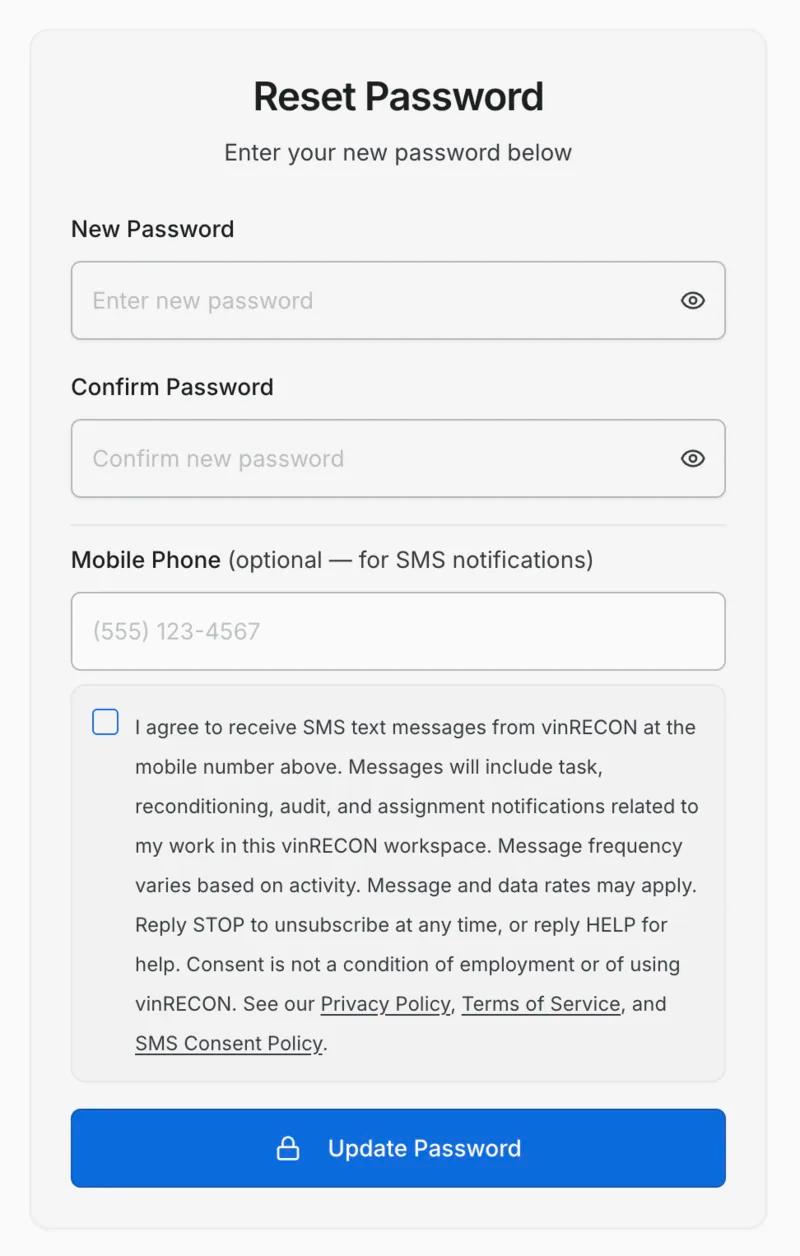
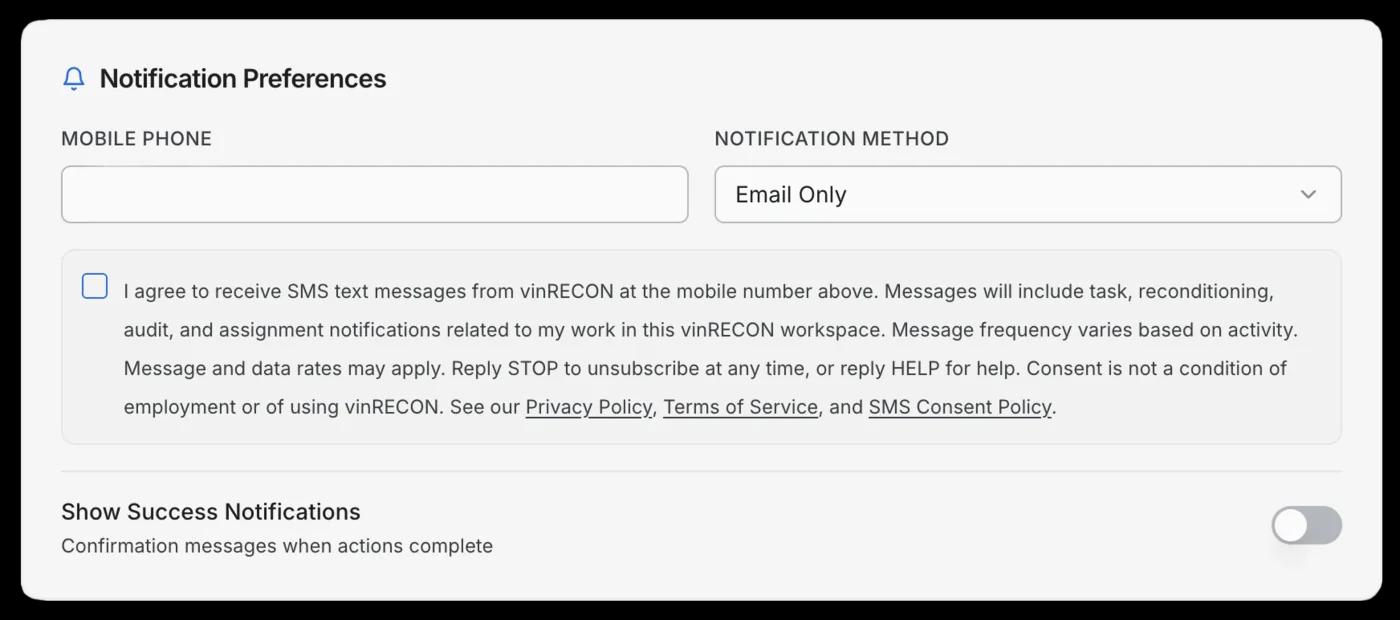
A new or changed mobile number cannot be saved without consent. Identically on the welcome/account-setup screen and in Profile → Notification Settings, the “Save” button is disabled when either:
- the consent box is checked but the mobile-number field is empty, or
- the consent box is unchecked, a mobile number is present, and that number differs from the number already on file.
Checking the box therefore remains optional for account setup: an employee can finish setup by leaving the pre-filled number untouched with the box unticked, and doing so does not block setup or restrict their use of vinRECON. Consent is required only to enter or change a number for SMS delivery.
The result is that a mobile number is never enrolled for ongoing SMS notifications without an affirmative action by the user — either ticking the consent box or replying YES to the one-time invite. The only message an administrator’s entry alone can produce is the single onboarding invite described above, which carries its own STOP, HELP, and rate disclosures and is never repeated.
When consent is given, the employee’s timestamp, IP address, user-agent, and the exact disclosure text shown are written to an immutable audit log in our database for proof-of-consent recordkeeping.
How Customer Consent Works
Messages to dealership customers are solicited transactional messages: the customer has asked the dealership for the specific item being sent. There is no customer opt-in checkbox and no public web form where a customer types their own number, because the request itself is what prompts the message.
We send customers exactly three message types, and nothing else:
- A trade-appraisal link the customer requested
- A deal quote the customer asked for
- The customer’s own signed copy of a quote they signed
The customer’s mobile number is collected by dealership staff at the moment the customer asks for that item — given in person or by phone, for the express purpose of sending it. We never send customers marketing or promotional messages.
The controls on this basis are suppression and logging. Every send is checked against a suppression list first, and each send and opt-out is logged against the recipient’s number. A STOP from a customer is recorded against that phone number and blocks all future sends to it. Customers can reply START to resubscribe. Opt-out handling for this audience is described in full under Opt-Out (STOP) below.
Types of Messages Sent to Staff
To staff, vinRECON sends only transactional, account-related notifications tied to the recipient’s work inside the platform. Examples:
- The one-time onboarding invite described above, sent at most once per user
- A task or checklist has been assigned to the employee
- A vehicle has moved to a stage the employee owns (e.g., detail, mechanical, photos)
- A reconditioning step is overdue or has been completed
- An audit has been scheduled, started, or flagged for follow-up
- A multi-location alert relevant to the employee’s assigned store
- Account security messages (e.g., login from a new device, password reset confirmation)
vinRECON does not send marketing, promotional, affiliate, or third-party content via SMS to any recipient — staff or customer. Phone numbers collected for SMS, from either audience, are never sold, rented, or shared with third parties for their own marketing.
Message Frequency
For staff, frequency varies based on the recipient’s role and the activity in their workspace. A typical user receives between 1 and 20 messages per day. Users can adjust or mute specific notification categories at any time inside Profile → Notification Settings.
The onboarding invite is separate from this figure and is sent at most once per user, ever. We never send follow-up or reminder texts to someone who has not consented. All other staff notifications are sent only after consent has been granted.
For customers, frequency varies as well: a message is sent only in response to a specific request the customer has made, so the number of messages depends entirely on how many times they ask a dealership for one of the three items listed above.
Cost
Message and data rates may apply. vinRECON does not charge recipients for SMS messages, but the recipient’s mobile carrier may charge standard messaging fees in accordance with the recipient’s wireless plan.
Opt-Out (STOP)
STOP always works, for every recipient — including in reply to the one-time onboarding invite, before any consent has been given. The available opt-out methods, the confirmation wording, and the way to re-subscribe all differ by audience.
Staff (vinRECON users)
Staff can revoke consent at any time using any of the following methods:
- Reply STOP, STOPALL, UNSUBSCRIBE, CANCEL, END, or QUIT to any message received from vinRECON
- Uncheck the SMS consent box inside Profile → Notification Settings in the vinRECON app
- Email info@vinRECON.com with the subject line “SMS Opt-Out” and the mobile number to remove
Upon receiving a STOP keyword, a staff member receives a single final confirmation:
You’ve been unsubscribed and will not receive further messages.
Replying START does not restore staff consent — a staff member who replies START receives:
To receive SMS from vinRECON, opt in from your vinRECON profile under Notifications.
and continues to receive no messages until they opt back in using that form.
To state the rule precisely: a texted YES grants staff consent only when it answers an outstanding onboarding invite (Path 1 above). A YES sent at any other time — including after a STOP — neither grants nor restores consent, and the sender is directed to the web form. Apart from that single invite reply, staff consent is granted and restored only in Profile → Notification Settings.
Dealership customers
Customers opt out by replying STOP. There is no customer login and no profile toggle, so STOP is the opt-out method for this audience. A customer STOP is recorded as a suppression against that phone number, and every send is checked against the suppression list before it goes out.
Customer messages are deliberately routed through Twilio rather than our other SMS path, specifically so that a STOP reaches our webhook. Twilio additionally enforces the opt-out independently on the sender/recipient pair, so a customer who has replied STOP remains protected at the carrier-facing layer even if our own suppression check were bypassed.
Upon receiving a STOP keyword, a customer receives a single final confirmation:
You’ve been unsubscribed and will not receive further messages. Reply START to resubscribe.
For this audience, replying START resubscribes the number. No further SMS messages are sent to any suppressed number unless it is resubscribed in this way.
Help (HELP)
Recipients can reply HELP to any vinRECON message. As with the STOP confirmation, the reply depends on the audience:
Staff (vinRECON users)
vinRECON: Manage SMS in your profile under Notifications. Reply STOP to unsubscribe. Msg & data rates may apply.
Dealership customers
vinRECON: We text appraisal and quote links you asked your dealership for. Contact your dealership for help, or email info@vinrecon.com. Reply STOP to opt out. Msg & data rates may apply.
Help is also available at any time by emailing info@vinRECON.com or calling (214) 603-8616.
Supported Carriers
vinRECON SMS notifications are supported on all major U.S. carriers, including AT&T, T-Mobile, Verizon Wireless, Sprint, Boost, Cricket, MetroPCS, U.S. Cellular, Virgin Mobile, and others. Carriers are not liable for delayed or undelivered messages.
Privacy
Mobile numbers and SMS opt-in data are handled in accordance with our Privacy Policy. No mobile information will be shared with third parties or affiliates for marketing or promotional purposes. Information shared with subprocessors (such as our SMS delivery provider, Twilio) is used solely to deliver messages and maintain compliance records.
Contact
Questions about this SMS Consent & Opt-In Policy or to request proof-of-consent records for a specific number:
- Email: info@vinRECON.com
- Phone: (214) 603-8616
- Location: Dallas, Texas